The Research , Wingman and Office sections showed agents doing physics, server administration and office work inside secdev containers. This section turns the same approach on the university website: an agent edits pages in the shared content management system, and a written procedure keeps the agent from doing harm. This page explains the idea; Workflow follows one editing session from the first command to the published page, and Technical Details describes the routes, the scripts and the release process.
The problem
The university runs its web presence on one content management system, OpenCms (the product; this project is named OpenCMS after it), with one template for every institute. Every editor works through the same browser application: a page editor, a form-based content editor, a file explorer, a locking system that stops two people editing one page at once, and a separate publishing step that makes a saved change public.
The system works, and it is slow to work in. Changing the time and room on a lecture page means finding the page, opening the right form, editing the right field, saving, checking the result and publishing. Adding a person to a team page means filling a structured form, uploading a portrait, ticking categories and publishing again. Each job is several minutes of careful clicking that must be done identically every time, and a slip goes live on the public website.
An agent, a language model that can run commands and drive a browser, can do this clicking. What makes the system hard for an agent is the same thing that makes it slow for a person: there is no stable programming interface through which a program could change a page directly. The only complete way in is the browser application, which was made for people and is clumsy even for them. So for most changes the agent has to drive a headless browser, a real browser without a window, and simulate the clicks a person would make: open the editor, wait for the form, find the field, type, save, publish. Finding one’s way through an interface made for humans is hard, and it takes the largest models available, the frontier models offered as cloud services, to do it reliably. A website that needs no such interface is the subject of A better approach at the end of this page.
Two more things stand in the way. The agent must never hold your password: a password in an agent’s hands is a password in a log file somewhere. And the agent must not break other people’s pages, which is easy to do on a shared system, where one wrong click publishes a colleague’s unfinished work.
The solution
The solution is a skill: a written procedure, with scripts, that the agent reads before it touches the system. The skill tells the agent how the system behaves, which route to take for each kind of job, what it may never do, and how to check its own work. With the skill, the agent can be used for three kinds of work:
- Keep a complex website up to date: fix dead links, find stale information, correct mistakes in text and layout.
- Extend an existing website with new subpages and content.
- Build complete page trees from scratch, as a rebuild of an institute or faculty website requires.
The procedure behind all three is split into one skill per layer:
- A generic skill applies to every university site on the shared template. It is the only one that is published.
- A private site skill knows one institute’s pages and habits: the twice-yearly semester rollover of the lecture pages, the team page, the publication slider on the landing page, and a register of the template recommendations the site has deliberately waived.
- A third private skill, the triage skill, sorts and works through (triages) the reports that agents file about the other two skills whenever the written procedure failed them; Evolving skills describes how those reports become the next version of a skill.
The central rule of the skill is about cost. Reading the site is cheap: a search service answers questions about every page without a login, without a browser and without touching the page. Writing is expensive: most changes go through the headless browser, which is slow and locks a page while the agent edits it. Only two narrow kinds of write, a page’s properties (its title, navigation text and similar settings) and file uploads, go over plain web requests without a browser. So the agent reads first, plans, and opens an editor only when it intends to change something. The three routes, in the order the skill prefers them:
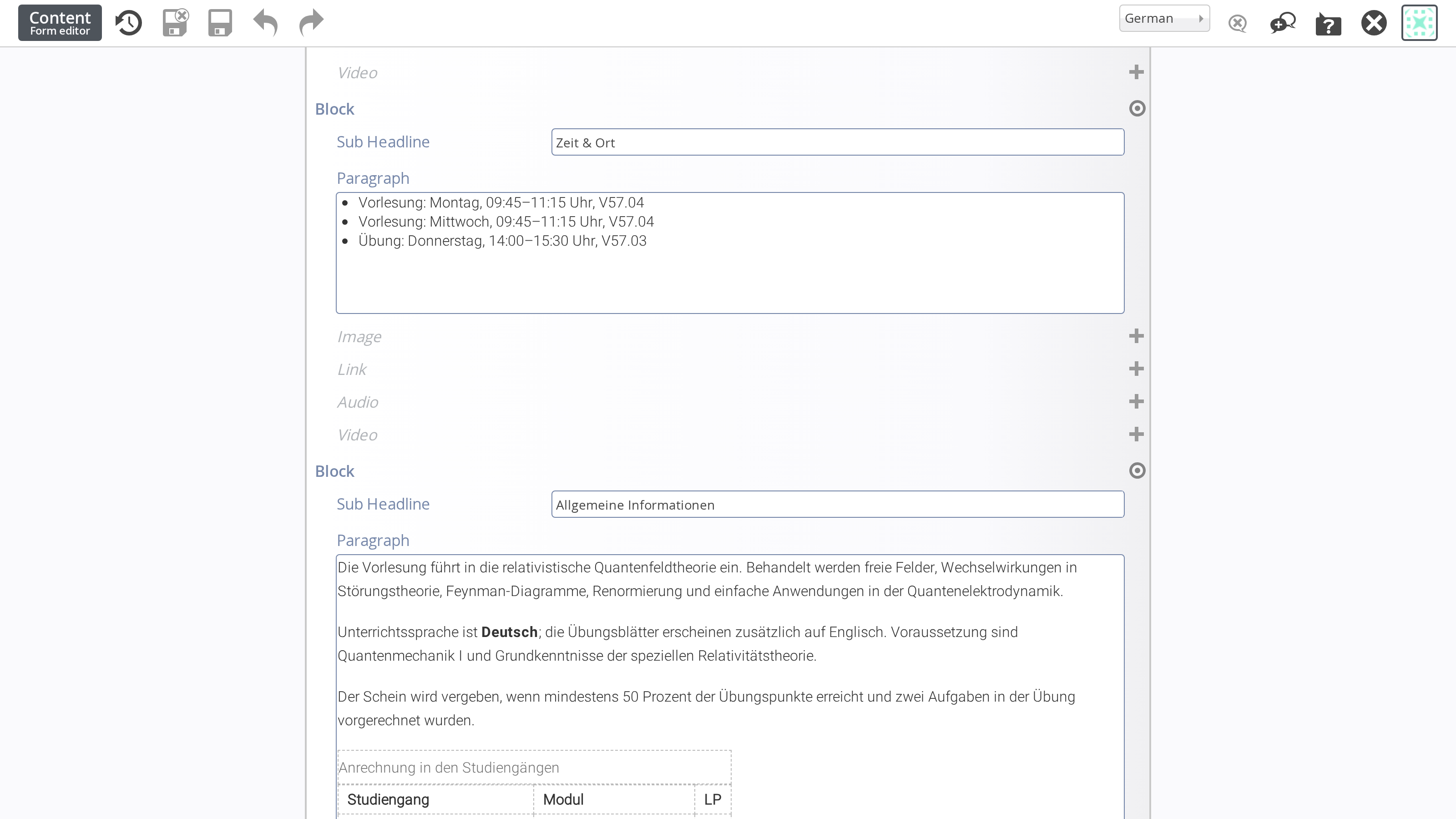
Most changes end in the content editor, the form through which the system edits one element of a page. The agent sees the editor exactly as a person does, since it drives the same browser. One such change, the time and room of a lecture, in the editor:
 (enlarge)
The agent must log in to the system to edit anything, and the problem section said that it must never hold your password. The answer is that the agent never gets one. You log in in your own browser as usual and hand the agent the session cookie, the token your browser holds to prove that you are logged in. The agent then acts with exactly your rights until you log out, and your password stays with you. Workflow shows the two steps this takes.
What you gain from the skill
You describe the change in a sentence. The agent finds the page, reads what is there, tells you what it intends to do, makes the change, checks the public result and asks before anything goes live. Your password stays with you. The agent’s access expires when you log out, so you can end it at any time by logging out in the browser you already have open.
The skill improves with use. Every session keeps a friction log, a record of the places where the written procedure was wrong or unclear, and those logs feed back into the next version of the skill. How that loop works is the subject of Evolving skills .
The generic OpenCms skill is available to university members on TIK GitHub under AGPL-3.0-or-later.
A better approach: a static website
The skill above teaches an agent to work an interface that was built for people, and that is the wrong layer to automate. This section is a comment on where the work should go instead. A website is a set of content files and a template that renders them, and both can be plain text in a folder. A static site generator, a program that turns such a folder into finished pages, replaces the whole editing system: no database, no internal file store and no application server to run, lock or drive. Hugo, the generator that builds this site, is one.
A site built that way can be edited through a chat window alone, with the work split between two kinds of model by what each does best:
- A frontier model, one of the largest hosted models, develops the template once: the layout, the content elements such as a lecture page or a team entry, and a written description of each element, which is the documentation an agent reads to use them.
- A local model, ideally run on the university’s own hardware, manages the content. It has the content files and the template’s documentation in front of it, and a request such as “update the lecture page with the new time and room” becomes an edit to one text file, checked by building the site.
Editing a page then takes seconds instead of a browser session, nothing is ever left locked, and the content stays in files that any editor can read and any version control can track. A small website demonstrating the workflow is planned.