The workflow showed one editing session from the user’s side. This page is the same machinery from the inside: which route the agent takes for each kind of operation, how locks behave, what the scripts do, how the generic and site layers divide, and how the skill is versioned and shipped.
Three routes into the system
There is no general write API: the university’s installation offers neither of the two standard interfaces for editing a content store, CMIS and WebDAV. The skill therefore combines three routes and tells the agent which to take for each kind of operation:
| Route | Used for | Needs | Cost |
|---|---|---|---|
| Solr JSON API | Every read: content inventory, a record’s stored fields, navigation membership, shared-element scans | University network or VPN; no session | Milliseconds, no lock |
| Plain HTTP | Properties and navigation position; uploads into gallery buckets | Live session | About a second |
| Headless browser (Playwright, Chromium) | Everything else: creating pages, editing structured content, placing and reordering elements, moving, deleting, publishing | Live session | Seconds to minutes; stateful; locks |
Solr. Solr is the search engine behind the site’s content index. The index answers without an OpenCms login, but only from the university network. Off campus the agent falls back to slower, authenticated reads through the Explorer, the file browser of the workplace, which is OpenCms’s name for its whole editing interface.
Plain HTTP. Two legacy endpoints set a page’s properties and upload files into galleries, the folders where OpenCms keeps images and downloads, without a browser. The upload never replaces an existing file silently.
Headless browser. The scripts drive the workplace with
Playwright
, a browser-automation library that
the browser and opencms images of secdev
ship together with Chromium. The workplace boots in a Chromium without a
window, and driving it is where the time goes: clicks are swallowed, dialogs outlive
their close animation, the address bar lies about which app is showing, and
a bad path leaves the Explorer where it was without any error. The skill’s
rule for the browser is verify by content, never by URL, and every wait is
for a condition, never for the clock.
Locks
An OpenCms write is a sequence with state: lock, edit, save, publish, unlock. A lock left behind blocks human editors until someone notices, so the skill measured the lock behaviour in the practice area and built its rules on the result:
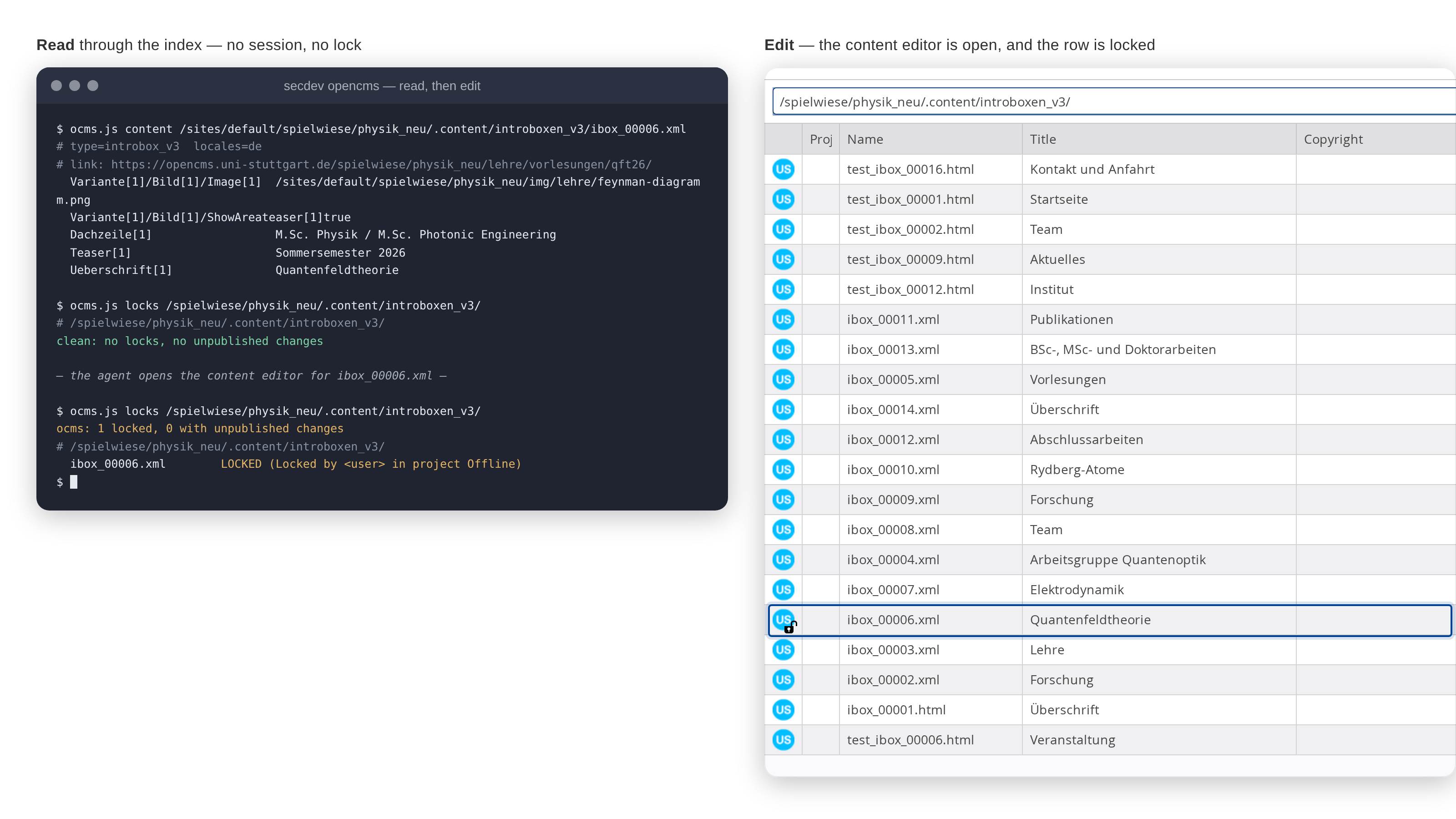
- Opening the page editor does not lock. Opening the content editor locks immediately, before any change, so opening the content editor is a write and needs authorisation.
- A property write locks and does not release; publishing releases the lock.
- An upload does not lock unless it also writes properties.
- A folder lock propagates to its children, and locks survive the browser closing.
None of this reaches the user. Every write script, listed under
The scripts
below, releases its lock on every exit path and
reports when a lock was left behind anyway. After a session the agent runs
ocms.js locks <folder> to list locks and unpublished changes, and
cpplace.js --unlock to release a stranded one. What the agent sees when it
reads and when it edits, side by side:
 (enlarge)
Structural protection
A few resources hold a whole site together, and deleting or renaming one of them does damage far beyond the resource itself. The skill refuses to touch four classes of them:
- A sitemap root, the folder at which a site or one of its language branches is rooted. Deleting one removes the whole branch together with its configuration.
- A detail page, the folder through which every address of one content type resolves, such as the page behind all staff profiles. No page visibly links to those addresses, so deleting the folder breaks them without any link check noticing.
- The site’s search page, which the header and footer of every page link to.
- The content and category folders, where the text of every page and the category definitions live. Pages themselves are thin; deleting the content folder empties the whole site.
The skill recognises these four classes by asking the server what a resource
is, not by matching its name. A folder is not protected for being called
team; a folder of team photographs may be deleted. The move and delete
scripts share the check, and the check fails closed: a check that
cannot complete is a refusal. Every other resource is protected by the
server’s own link check, which refuses a deletion that would break
references and lists what still points at the target.
Publishing
Editing a page in OpenCms changes only an offline copy; nothing reaches the public website until the page is published. The publish dialog offers three scopes for that step:
- This page publishes the resources of the current page only.
- My changes publishes everything changed under the current account.
- The whole project publishes every unpublished change of every user, including colleagues’ half-finished pages.
The agent publishes with the first scope and never with the third. Its publish script first lists what would go live and asks the user, and only then publishes.
The scripts
The generic skill’s scripts/ directory holds the scripts listed below.
None of them was designed up front. Each was written during the
exercises
that
explored OpenCms, when an agent had run into the same trap once too often,
and each has been honed since through the friction reports of daily use,
the loop that the Evolving skills overview
describes.
Every script reads the session from a file in the project directory, and
every write requires --confirm:
| Script | Role | Notes |
|---|---|---|
ocms.js | read-only CLI | Inventory, tree, index, content, shared elements, layout, locks, protected resources, navigation; write subcommands are forbidden |
session.js | helper | Loads the session and pins the connection to the address family (IPv4 or IPv6) on which the session authenticates |
waits.js | helper | Condition-based readiness helpers for the widgets of the workplace |
protected.js | helper | The structural protection check; fails closed |
props.js | write, no browser | Read and write resource properties |
upload.js | write, no browser | Upload into gallery buckets; never replaces silently |
newpage.js | write | Create a page below a parent with title and navigation text |
buildsite.js | write | Build a page tree from a JSON spec; plan first, then apply; resumable |
newcontent.js | write | Edit or create structured content of any type, including a second locale and an image |
inlineedit.js | write | Change one visible plain-text field on the rendered page, guarded by the exact old text |
cpplace.js | write | Place, reorder and remove elements in container pages (OpenCms’s name for pages assembled from elements; unrelated to secdev containers); release stranded locks |
move.js | write, URL-changing | Move or rename, with the protected guard |
delete.js | write, destructive | Refuses protected structure and link-breaking deletions |
publish.js | write, outward-facing | Scope-explicit publishing; rehearsal by default |
revert.js | write, the undo | Discards unpublished changes, restoring the published state |
sliderfit.js | read-only | Renders a page and measures every slide of a slider; no session needed |
linkcheck.js | read-only | Sweeps every link and image under a site path and classifies each answer instead of counting |
report.js | tracker client | Files and follows friction reports; never reads the session, talks to a different host |
The scripts are the skill’s memory of what bites. A rule that lives in a script’s refusal message is read at the moment it is needed; a rule in a reference file is read only when someone thinks to open it. Beside the scripts are reference files, loaded selectively as a task needs them.
The three skills
The skills are developed in one private repository on the institute’s Git server, and that repository holds three of them, split by layer rather than by task: a public generic layer, a private site layer, and a private triage skill. The triage skill is not about OpenCms at all: it is the maintainer’s side of the Evolving skills overview , the procedure for turning the friction reports that agents file into the next release of a skill, applied here to the other two skills. The following table shows what each contains, where each applies, and how each is distributed:
Generic skill secdev-opencms-workplace | Site skill (private) | Triage skill (private, from Evolving skills) | |
|---|---|---|---|
| Contains | Authentication policy, the three routes, the content model, locks, structural protection, publishing scopes, browser mechanics, the element catalogue, the scripts, the friction-log procedure | One site’s directory layout, naming conventions, page-layout patterns, its declared deviations from the template’s recommendations, and its recurring editorial jobs | The procedure for working the friction-report queue: pull the reports, reproduce each finding, patch the narrowest correct file, close the report against the committed skill version; plus a client script for the tracker |
| Transfers to | Any university site on the shared template (Template 3.0) | One site | The other two skills; the procedure itself is generic to any tracked skill |
| Distribution | Public mirror; copied into the opencms image | Mounted at run time with --skills; not published | Linked into a development checkout; not published |
| What it may record | How the platform works, with the version and evidence | Deliberate departures from the recommendations, which also apply to the pages below | The classification rules that keep one project’s local state from becoming a rule in a shared skill |
The split also decides where a lesson is written down. When an agent reports that the skill failed it, the maintainer first asks what kind of lesson the report contains, and there are three answers:
- Something about how OpenCms works, true for every university site, goes into the generic skill. The test is whether the fact would still hold on a site nobody has seen yet.
- Something about one site, such as where its lecture pages live or a template recommendation it has chosen to ignore, goes into that site’s skill.
- A defect of the running system, a feature that is broken today and will be fixed one day, goes into neither skill but into a dated defect note. A workaround written into a skill would outlive the defect it works around.
The upstream source of truth for the template is the public Dokumentation Template 3.0 (in German) of the university’s IT centre (TIK). The generic skill distils that documentation and treats it as good practice, not as a specification: the agent follows the surrounding site’s convention and never restructures existing pages to comply. Legal obligations, namely copyright and accessibility, are the exception and do bind.
Versioning
Each skill carries its own VERSION file in calendar form, the release date
plus a counter for several releases on one day (YYYY.MM.DD.N), and a
release is a commit on master carrying a tag of the form
<skill-name>/v<VERSION>. Friction reports name the installed version of the
skill they are about, and a fix is closed against the version that carries
it. The rules behind that, and what “fixed” means, are on the
Evolving skills Technical Details page.
Distribution
Development and releases happen in a private repository on the institute’s Git server, and a release is complete once the tagged commit is there. Two optional steps carry a release further:
- The public mirror at itp3opencms is a filtered snapshot of the generic skill without development history.
- The
opencmsimage carries a copy of the generic skill, which lives in the secdev repository and is refreshed by the same filtered export.