secdev is the central project on this site: every other one runs inside it
or borrows its design. This page makes the case for it: what goes wrong when an
AI agent works on your own machine, and how a small, disposable world fixes
that. Workflow
shows the sandbox in use, Technical
Details
takes it apart, and Example
picks one of its
many uses, an editorial review of a thesis chapter, and follows it from the
request to the PDF.
Problem: an agent that stops asking runs with your full rights
A coding agent is a chat model with hands: a program that takes a task in plain language and then, on its own, reads files, edits them, runs commands, installs software and checks the result, looping until the task is done. Every current agent has a mode in which it stops asking for permission before each of those steps. The vendors’ names for it differ; users call it YOLO mode, after “you only live once”, and the effect is the same.
This mode is not a misfeature. It is where the value is. An agent that pauses for approval on every step turns a twenty-minute task into a two-hour one, and it trains you to click yes without reading. That habit has a name, confirmation fatigue, and it is worse than not asking at all: the dialogs are still there, but nobody reads them.
The problem is the chain that follows from autonomy:
An agent running as you can read or delete your private files, send anything it finds to any address on the internet, and use whatever memory and processor time it likes. None of that needs malice. A confidently wrong delete, a helpful “let me clean up these old files”, a debugging step that uploads a log: the ordinary failure modes are enough.
How a sandbox resolves the problem
The instinct is to constrain the agent: better prompts, stricter rules, a permission dialog with more detail in it. All of these degrade the thing that made the agent useful, and none of them enforce anything. An agent that has been asked not to touch your SSH keys is not prevented from touching your SSH keys.
secdev takes the other route. It leaves the agent unconstrained and shrinks
its world instead. The world is a container: a lightweight, throwaway copy of
a Linux system that shares your computer’s hardware but has its own files, its
own installed software and its own view of the network. Used this way, as a
fence around a program you do not fully trust, a container is a sandbox. The
following diagram shows the arrangement, in which the agent keeps its full
rights inside the container, but the only thing those rights reach is the
project directory, and the path to everything else on your machine does not exist:
A sandbox earns its place for three reasons, and the third is the one that is easy to overlook:
- Security of your machine. Whatever the agent does, it does to a throwaway copy of a Linux system that holds one project. Your files, your mail and your keys are not in it.
- Data protection. Not every dataset may go to the cloud. An agent that sees only the project cannot upload what lives elsewhere on your disk by mistake. Where the data must not leave the institute at all, a variant of the container connects the agent to a model running on institute hardware instead of a cloud service.
- Friction. Agents are command-line professionals. To work quickly, and
to spend few tokens, the units of text a model is billed by, they reach
for many tools, some of them obscure: converters, linters, a TeX
distribution, a browser that runs without a screen (a headless browser),
optical character recognition. On your own machine every missing tool is a
stall or an installation you did not ask for. The
secdevcontainer images, the ready-made templates a container starts from, ship them, so the agent finds what it expects and gets on with the work.
Four properties of the container deliver these three benefits:
The agent sees one project
The folder you are working in is the only part of your disk that exists inside the container. It appears there under the same path it has on your machine, so tools behave normally. Nothing else does: not your home directory, not your mail, not your keys.
The agent has a full toolchain
The container is not a bare shell. It carries compilers, language runtimes, test tools, and, depending on which image you start, a TeX distribution, headless browsers, a scientific Python stack or a document-conversion suite. The agent does not stall for lack of a tool, and it does not have to install one on your machine.
You choose the agent
The same container ships Claude Code, OpenAI Codex, Cursor, Antigravity, OpenCode, Mistral Vibe, GitHub Copilot and Aider. You pick the agent; the sandbox is the same.
The agent cannot publish
By default the container holds no key to any Git server, so the agent cannot push its work anywhere. Publishing is a human act, performed on your machine, after you have read the result. An optional agent identity gives one named agent its own key and lets it push to its own project repository; Technical Details explains it.
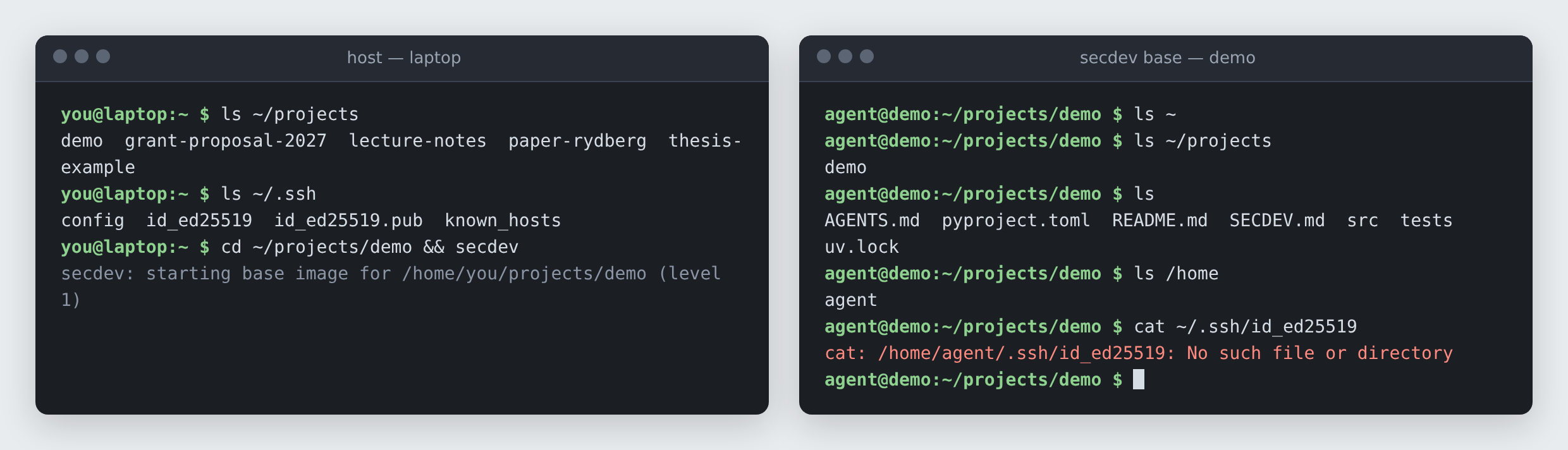
The following screenshot shows the first property from both sides. On the
left, a terminal on your machine lists the project next to grant proposals,
lecture notes and your SSH keys, then starts secdev in the project. On the
right, a terminal inside the container lists the same project with its files,
but the projects folder holds nothing else and the SSH key is not there:
 (enlarge)
One more limit is on by default: memory, processor and process counts are capped, so a runaway agent slows itself, not the machine you review it on.
What you gain from the sandbox, and what you do not
What you gain is permission to stop watching. Once the worst realistic outcome of an unattended agent is “the project directory is a mess and I reset to the last commit”, leaving one running for an hour, or overnight, becomes a reasonable thing to do. Every later project on this site depends on that being true.
secdev is available to university members on TIK GitHub under AGPL-3.0-or-later.