The overview argued that a sandbox is worth having because it lets you stop watching the agent. That argument only holds if there is still a point where a person reads the work. This page walks through a session from installation to push and shows where that point is.
The four-step loop
Every session follows the same four-step loop; only the first pass clones the project’s repository, every later one pulls what the previous pass pushed. The following diagram shows where the work happens and where the person reads it; the steps below unfold that loop, after three one-time setup steps:
The running example below is a small task: a Python package needs a command-line entry point and tests for it. The agent is Claude Code; every other agent the container ships works the same way.
Install once
secdevneeds Podman (the program that builds and runs containers), Python 3, Git and bash. On Linux nothing else needs setting up; macOS and Windows run the same scripts inside a Linux virtual machine. Clone the repository, build the images you need, and install the launcher:git clone \ https://github.tik.uni-stuttgart.de/ac114192/secdev.git cd secdev # the LaTeX image (see the next step) and the images it # builds on; plain ./build.sh builds base only, and # ./build.sh --all builds every image ./build.sh tex # puts `secdev` in ~/.local/bin and writes a first # ~/.config/secdev/config.toml ./install.shbuild.shwith no argument builds only thebaseimage../build.sh --allbuilds every image, which takes tens of gigabytes and tens of minutes; building one variant and its parents is a fraction of that.install.shasks two optional questions, about a supervisor chat channel for the research workflow and about remote compute hosts (both used only by the research images, described under Research ); press Enter through both if you do not need them.Then check that the launcher is installed:
secdev --helpThe launcher prints its commands, the image variants and the options. The first start, in the third step below, shows whether the image starts and the project is visible inside it.
Decide which environment the project needs
The sandbox comes as a family of images. Each adds one kind of toolchain to the same base, and each carries the same agents. Pick the smallest image that has what the project needs; its name goes after
secdevon the command line, andsecdevalone startsbase. Some images also carry skills, written procedures an agent follows for a particular task.Image Adds Use it for baseC/C++, Rust, Go, Python and Node toolchains, uv, the usual search and text tools, and the bundledsecdev-software-documentationandsecdev-explanatory-writingskillsOrdinary software development browserPlaywright driving Chromium and Firefox without a screen (headless browsers) Testing web applications, taking screenshots webApache, PHP and Hugo, on top of browserWebsites and PHP applications opencmsA skill for the university’s content management system, on top of browserEditing university web pages texA full TeX Live, latexmk,biber,pandoc, spell-checkers and two writing skillsPapers, theses and slides newtonThe scientific Python stack, Maxima, Octave, gnuplot, Fortran, Lean and the fixed project layout for research (the research scaffold), on top of texSimulations and calculations einsteinSSH access to the configured compute hosts and remote storage, on top of newtonResearch that needs the cluster or a graphics processor (GPU) officeLibreOffice, text recognition for scans (OCR) and PDF-form tools with document skills, on top of texDocuments, forms and scanned paperwork localOpenCode routed to a model on institute hardware Data that must not leave the institute An image inherits everything from its parent, so
newtoncan also typeset the paper about the simulation. Build the image once with./build.sh <name>; the technical page describes the family in full.Open a terminal in the project and start the sandbox
Change into the project root and run the launcher with the image you chose. The directory you are in is the directory the agent gets, so start from the project, never from your home directory.
cd ~/projects/demo
# a local commit is not a backup; the agent can delete .git
git push
secdev tex
The first run in a directory asks one question:
secdev-init: set up SECDEV.md and AGENTS.md in
  /home/you/projects/demo? [y/N]
Answer
y. You land in a shell inside the container, in the same path, with the same files.ls ~shows nothing of your real home directory.What the agent reads at start
Two files now sit in the project.
SECDEV.mdis the container briefing: a manifest the container writes at every start that tells the agent where it is and what it may do, which tools exist, which directory is visible, what the current security settings allow, and what it must not attempt. An agent that has read it does not discover its limits by running into them. The file is regenerated at each start, so do not edit it.AGENTS.mdis the file most agents read first;secdevadds one marked block to it that points at the briefing:Your own notes go in
AGENTS.mdoutside the markers; they are preserved. The briefing itself is readable, and its first sections tell the agent which directory it may touch and what the current settings allow: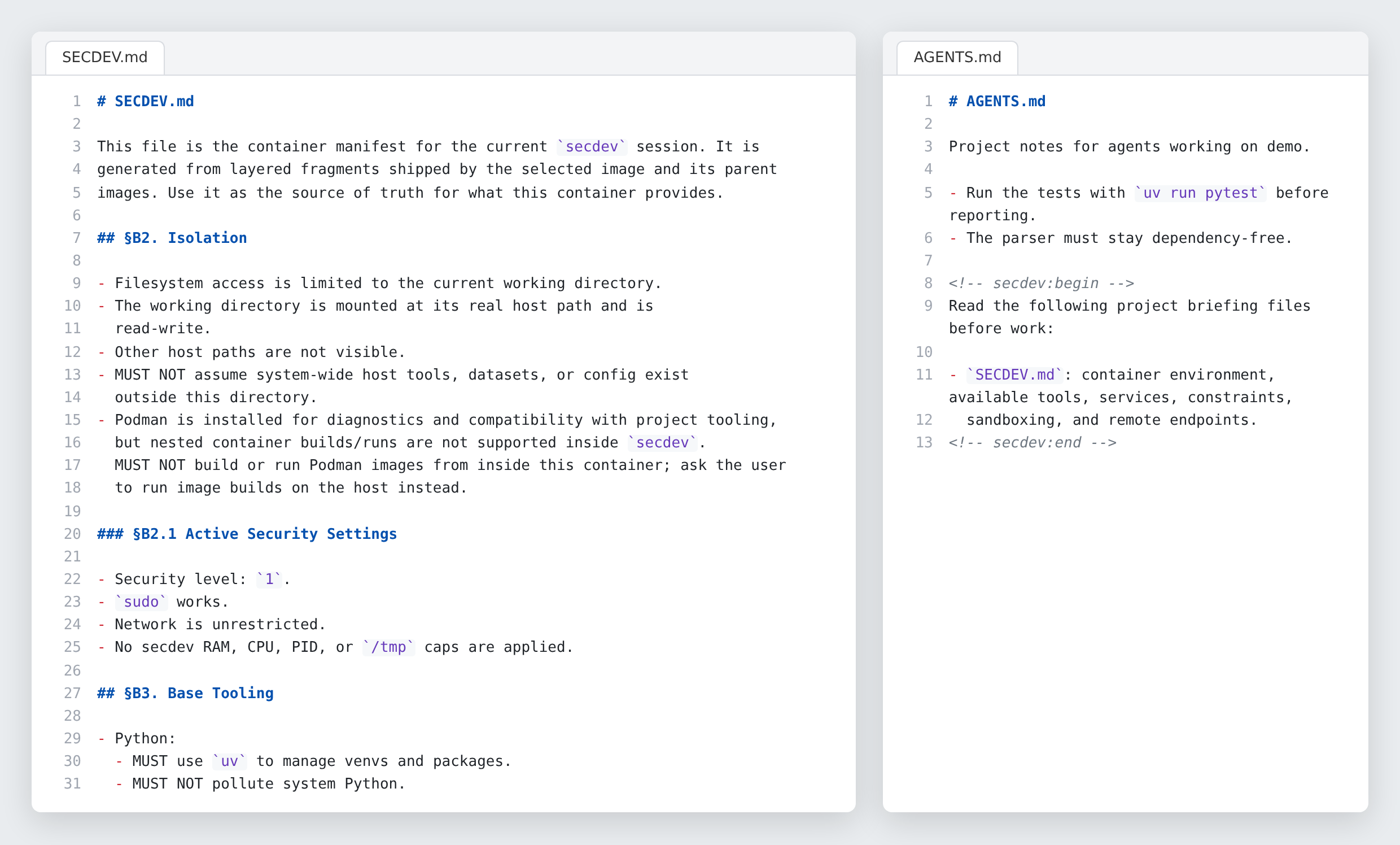 (enlarge)
The container writes a description of itself for the agent to read before it starts work. Work inside the container
Start the agent in its no-questions mode. Every agent has one;
secdevnames them with adsuffix (clauded,codexd,opencodedand so on):claudedThen hand it the task:
Prompt to the agent:Add a
democommand-line entry point that prints the package version, wire it up in pyproject.toml, and add tests. Run the tests before you stop.The agent reads
AGENTS.md, thenSECDEV.md, then the code. It creates a private Python environment withuv, editspyproject.toml, writesdemo/cli.pyandtests/test_cli.py, runspytest, fixes a failing assertion, runs it again, and reports. If it needs a package, it installs it into the project’s environment, not the system. You can walk away during any of this.When the agent is done, it commits locally if you asked it to, and stops there. The container briefing
SECDEV.md, which the agent read at start, says so in its Git section:The rule is written down for the agent, but it is also enforced: there is no key in the container to push with, unless it runs under a named agent identity, described under the same loop for other jobs below.
Review on the host, in a second terminal
Open a second terminal on your own machine, not in the container, and read what changed:
cd ~/projects/demo
git status
# or: git log -p -1, if the agent committed
git diff
uv run pytest           # rerun the tests yourself
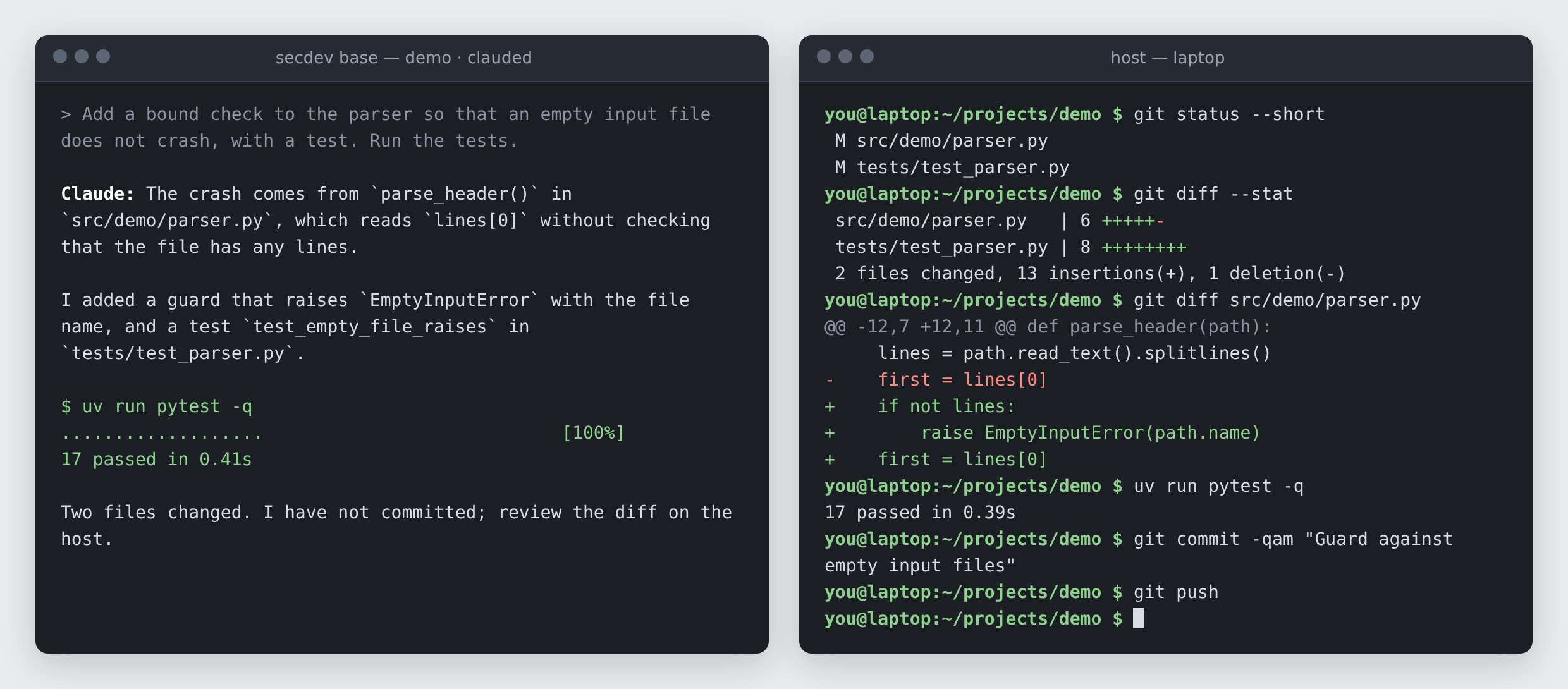
For documents, compare the rendered PDFs rather than the source. This is the review that the sandbox exists to make possible: you did not watch the agent work, so you read the result instead. The two terminals side by side:
 (enlarge)
Left: the agent inside the container, finishing the task. Right: a terminal on your own machine showing the diff of the same repository, where you review and push. Push from the host
Push from the same terminal on your own machine, committing first if the agent did not:
git add -A && git commit -m "Add demo CLI entry point"
git push
The agent can commit inside the container, but it cannot push unless it runs under an agent identity, because the container holds no key to the Git server. Withholding the key is the mechanism, not an inconvenience: it turns the review into a structural step rather than a habit, and habits erode once a tool becomes routine.
The same loop for other jobs
The secdev launcher is one command with a few choices, and the four-step
loop above does not change with any of them. What changes is the image and
the options. The following list names the typical jobs, each with the command
that starts it:
Edit a paper or a thesis.
secdev texStarted in the manuscript directory, the
teximage gives the agent a full TeX distribution and two skills, written procedures it follows for a task: an editorial pass that writes numbered margin notes into the manuscript on a Git branch of its own, and a converter that turns a sketch into a figure drawn in LaTeX’s TikZ language. Ask for “an editorial pass over chapter 3” and the agent reads the skill first, then works. Example shows one such review from the request to the finished PDF.Look at a repository without keeping anything.
secdev --tmp browserThe launcher creates a unique workspace under the
secdevcache, prints its path, and deletes it when the container exits. Clone something into it, let the agent explain or test it, and nothing remains.Use your own skills.
secdev --skills ~/skills/my-site-skill opencmsThe option mounts a directory of skill folders, or a single skill, read-only into the container and links it into every agent’s skill directory at start. Edits on the host take effect immediately. The command above is how the OpenCMS project mounts a private site skill on top of the generic one the image ships. Mounted skills, like the ones an image ships, are read-only for the agent. The container briefing
SECDEV.mdsays so:Edit the university’s website.
secdev opencmsThe variant is experimental. It never holds a password: you log into the content management system in your own browser, copy the session cookie into a file,
session.json, that Git ignores, and the agent works with that session until it expires. OpenCMS walks through one editing session and quotes the policy the container briefing sets.Give the agent an extra directory.
secdev /path/to/referenceThe path is mounted read-only beside the project.
Open a second shell in the running container.
secdev attachRun from the same host directory, the command opens another shell in the running container. Use it to watch a log or run a test while the agent keeps working in the first.
Let the agent push its own work.
secdev --identity pi newtonThe container runs as an agent you have named, here
pi, with its own SSH key for a Git server and its own saved logins. That lifts the no-push rule for one repository. The setup, and the caveat that comes with it, are on Technical Details .Stay logged in to the agent’s service.
secdev --auth claudeCloud agents authenticate through a browser, and the container has no browser you can see. For Codex, choose its device-code login: open the URL it prints in the browser on your host and enter the code. Claude Code’s login needs no workaround: run it inside the container as usual. Logins are forgotten when the container exits unless you ask
secdevto keep them:--auth claude(or--auth codex) stores that agent’s state in a private volume that no project and no image can see.
Long sessions
A run that lasts hours should not die because you closed a window. Start the
launcher inside tmux, a program that keeps a shell alive on the host after
you disconnect:
tmux new -s agent      # on the host, not in the container
secdev newton          # then start the agent inside
Leave the session running in the background (detach) with Ctrl-b d;
reattach later, from another machine over SSH if you like, with
tmux attach -t agent. The research workflows
run unattended for days in exactly this way.
Two helpers inside every container support long runs. usage reports how much of
the agent account’s allowance is left and when it resets, and can sleep across
a reset so a long run pauses instead of failing. host_info reports the
processors, memory, limits and disk the container has, so an agent sizes a job
before launching it.
Updating secdev
One script updates the checkout, the images and the launcher together:
# from the checkout, with no secdev containers running
./update.sh
The script pulls the latest checkout first. If the installed version already
matches the checkout, it stops there. Otherwise it rebuilds the images you have installed without the
build cache, prunes what the rebuild replaced, and reinstalls the launcher
without asking the setup questions again. The pruning is store-wide: it
removes dangling images and build cache from every project in your Podman
store, not only those of secdev. For a tool that releases often, an update that
stops to ask questions is an update that gets postponed.