The institute runs its own servers, and somebody has to look after them. This section describes Wingman, a small service that lets an AI agent — a language model that can call tools and act on the results, rather than only answer questions — do part of that work without holding any of the access.
The problem
The servers of an institute are not a uniform fleet. They were bought at different times for different purposes, run different Linux distributions and versions, and each carries the services and the accumulated configuration of its own history. Tools that stamp one configuration onto many identical machines, such as Puppet or Ansible, help little here; what makes the work time-consuming is that every machine is a special case, and every task starts by finding out how this particular one is set up.
That is where an agent shines. Half of system administration is reading: logs, package lists, running processes, configuration files. An agent reads faster than a person, knows the commands and conventions of every distribution, adapts to whatever it finds on the machine in front of it, and writes the report at the end. The other half is doing: installing updates, finding out why a service crashed in the night and bringing it back, setting up a new service, removing one that nobody uses any more. An agent is good at this too, and it is the half that saves an administrator the most time, because each of those jobs is a chain of commands that has to be composed, run and checked, and composed differently on the next host.
Doing needs write access. To reach a server at all, the agent needs SSH — the encrypted remote login that administrators use to reach a machine — and usually the right to become root, the account that can change anything. One mistyped command with those rights is not a bad afternoon but a restore from backup.
The usual answers do not fit. A read-only account rules out half the legitimate work. A list of allowed commands is either too short to be useful or too long for anyone to have reasoned about. Asking the agent to be careful is not a mitigation; it is the absence of one.
There is a second constraint, and it decides which models may be used at all. What an IT administrator sees is confidential: user names, mail, home directories, the layout of the network, the findings of a security review. None of it may leave the institute network, so a service that sends a prompt to a commercial model on the internet is out of the question. Wingman therefore runs only on open-weight models hosted on the institute’s own GPUs: models whose trained weights are published and can be run locally. Everything the agent reads and writes stays on the premises.
The solution
Wingman splits the agent from the key. The agent runs inside a secdev sandbox and holds no SSH key, no password and no route to the servers. What it has is a set of tools — look up a host, run a command, start a long job, copy a file, search the history — offered over MCP, a standard way for an agent to call a tool that lives in another program.
On the other side of that channel, on the administrator’s own machine, a small service keeps the SSH key and the machine inventory. Every request the agent makes appears as a card in a browser dashboard: the host, whether root is needed, the exact command, and the reason the agent gave. The administrator allows it once, allows commands made of the same programs for good, or declines with a note. Only an approved request opens an SSH connection. The agent receives the result and nothing else. The following diagram shows the path of one request:
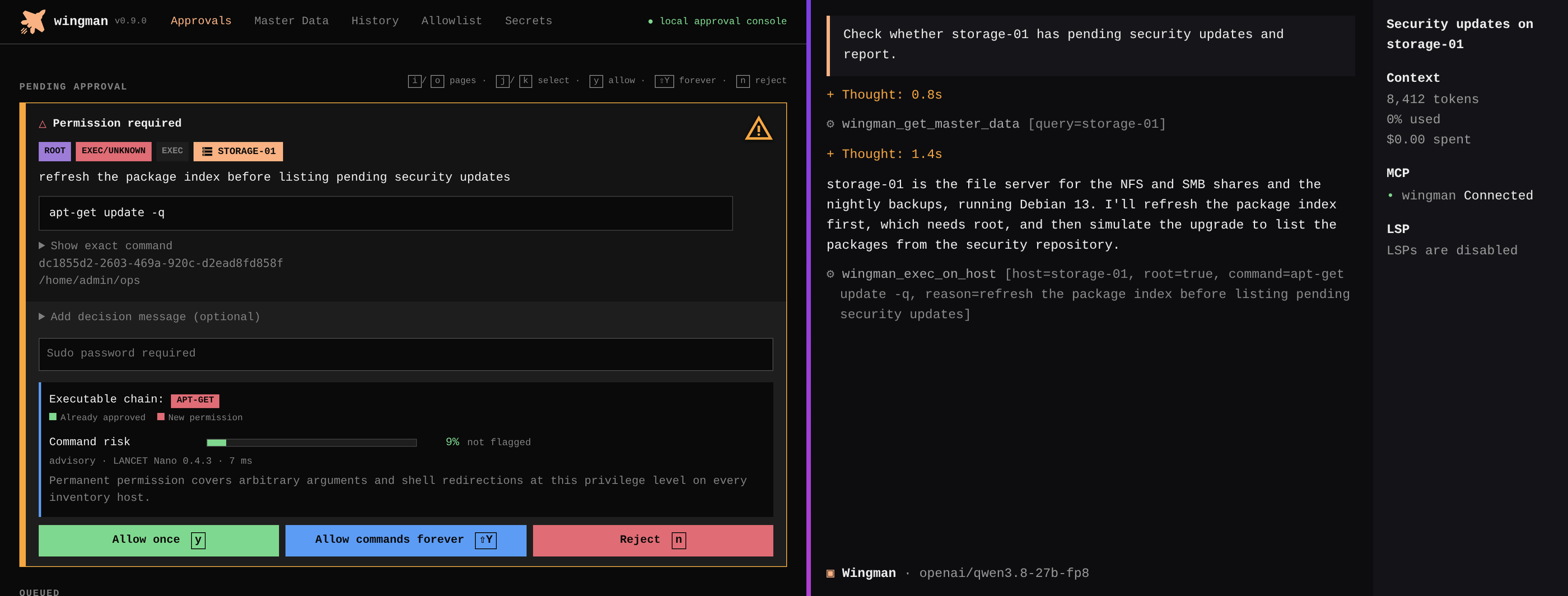
In use, that path has two visible ends, and the screenshot below puts them side by side. On the right is the agent’s terminal, running inside the sandbox: the agent has been given a task on a storage server and is formulating its requests, each a tool call naming the host, the command and its reason. On the left is the dashboard in the administrator’s browser, served by the Wingman service on the administrator’s own machine: the agent’s request has arrived as a card, a refresh of the package index on that server, with the host, the command, the reason and the buttons to allow it once, allow its kind for good, or decline. Nothing has reached the server yet. The command runs only after a click on the left, and its output then appears on the right:
 (enlarge)
Every request card that waits for a decision also carries a risk mark, to guide the decision rather than make it. A small classifier, a model trained on shell commands that runs on the administrator’s machine, reads the command before the person does and rates how destructive it could be: red and blinking for a command that could delete data or break a system, orange for one that deserves a closer look, green for one that only reads. The classifier sees nothing but the command text, needs no network, and answers in a few milliseconds, so the mark is on the card by the time the person reads it. It is a classification, not a verdict: the person still decides, and a green mark does not approve anything.
The same card is where root enters the request path. A request that needs
root carries a password field, visible in the screenshot above, and the
administrator types the server’s sudo password (the password the sudo
command asks for before running something as root) into it when approving.
Wingman keeps the password in memory for a while, supplies it to sudo over
the SSH connection it opens for the approved command, and never writes it
anywhere or shows it to the agent, which sees only the command’s output.
Some services need an account password of their own, a database superuser for
example. The administrator keeps such passwords in an encrypted store in the
dashboard, and the agent never sees them. Where a command needs one, the agent
writes a placeholder that names the stored password, such as
{{secret:db-admin}}. Only after the person approves the command does Wingman
put the password in its place, and Wingman removes the password from everything
that comes back.
What the administrator gains
A second administrator, in effect: one who knows every command of every distribution by heart, never has to look up a flag, and is on any server in the inventory the moment it is asked, without the walk through logins and shells that a person needs to get there. The first tests bore that out: the time the administrator spent logged into servers over SSH dropped by more than half.
The tedious part of both halves of the job, reading and doing, moves to the agent: collecting evidence from a dozen machines and turning it into a readable report, and then composing the commands that fix what the report found, running them, and verifying the outcome. The decision stays with the person, and a decision costs one keystroke. The administrator can approve a routine read-only command for good with one keystroke, so the dashboard interrupts only for requests worth a look.
Passwords stay out of the conversation. The administrator types a service password once, into the dashboard. From then on the agent can use that password without the password ever appearing in the chat, the agent’s context or its results.
Wingman records everything: approved, refused, expired and cancelled requests alike, with secrets stripped out. The history answers the question that matters at the end of the week, which is what the agent has been doing.
Wingman is available to university members on TIK GitHub under AGPL-3.0-or-later.